springmvc 入门知识
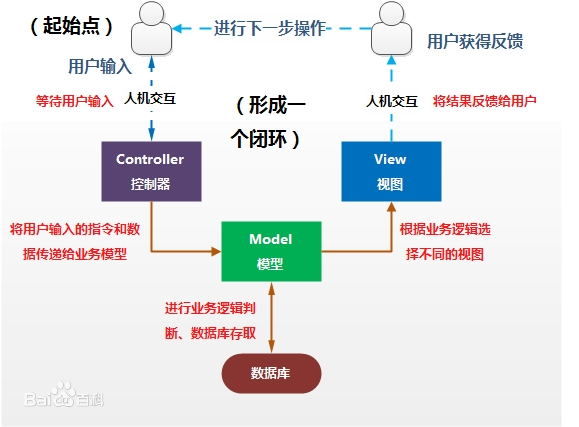
MVC 模式简介 MVC 的全名是 Model View Controller,是模型 (model)-视图 (view)-控制器 (controller) 的缩写,是一种软件设计典范。它是用一种业务逻辑、数据与界面显示分离的方法来组织代码,将众多的业务逻辑聚集到一个部件里面,在需要改进和个性化定制界面及用户交互的同时,不需要重新编写业务逻辑,达到减少编码的时间。
Model 模型 完成业务逻辑:由 javaBean 构成,在 MVC 的三个部件中,模型拥有最多的处理任务。(dao, service)View 视图 负责跟用户交互的界面。一般就是由 HTML,CSS 元素组成的界面,当然现在还有一些像 js,ajax,flex 一些也都属于视图层。Controller控制器 接收请求—>调用模型—>根据结果派发页面并经过模型处理返回相应数据 (servlet,主要目标是转发和重定向)
最典型的 mvc 是 jsp+servlet+javabean 的模式
servlet 简介 Java Servlet 是运行在 Web 服务器或应用服务器上的程序,它是作为来自 Web 浏览器或其他 HTTP 客户端的请求和 HTTP 服务器上的数据库或应用程序之间的中间层。
下图显示了 Servlet 在 Web 应用程序中的位置。
Servlet 执行以下主要任务:
读取客户端(浏览器)发送的显式的数据。这包括网页上的 HTML 表单,或者也可以是来自 applet 或自定义的 HTTP 客户端程序的表单。
读取客户端(浏览器)发送的隐式的 HTTP 请求数据。这包括 cookies、媒体类型和浏览器能理解的压缩格式等等。
处理数据并生成结果。这个过程可能需要访问数据库,执行 RMI 或 CORBA 调用,调用 Web 服务,或者直接计算得出对应的响应。
发送显式的数据(即文档)到客户端(浏览器)。该文档的格式可以是多种多样的,包括文本文件(HTML 或 XML)、二进制文件(GIF 图像)、Excel 等。
发送隐式的 HTTP 响应到客户端(浏览器)。这包括告诉浏览器或其他客户端被返回的文档类型(例如 HTML),设置 cookies 和缓存参数,以及其他类似的任务。
Hello Servlet 在学习之前安装的工具有:
jdk 1.8
创建servlet项目
为项目添加web框架支持
创建servlet类继承HttpServlet,重写doGet和doPost方法
步骤:
使用 idea 创建maven项目
编写测试页面 导入 pom 依赖
1 2 3 4 5 6 7 8 9 10 11 </dependency > <dependency > <groupId > javax.servlet</groupId > <artifactId > servlet-api</artifactId > <version > 2.5</version > </dependency > <dependency > <groupId > javax.servlet.jsp</groupId > <artifactId > javax.servlet.jsp-api</artifactId > <version > 2.3.3</version > </dependency >
为项目添加 web 框架支持, 将 servlet 注册到 web.xml
1 2 3 4 5 6 7 8 <servlet > <servlet-name > hello</servlet-name > <servlet-class > com.cp.servlet.HelloServlet</servlet-class > </servlet > <servlet-mapping > <servlet-name > hello</servlet-name > <url-pattern > /hello</url-pattern > </servlet-mapping >
创建 servlet 类继承 HttpServlet,重写 doGet 和 doPost 方法
1
2
3
4
5
6
7
8
9
10
11
12
13
14
15
16
17
18
19
20
21
public class HelloServlet extends HttpServlet @Override protected void doGet (HttpServletRequest req, HttpServletResponse resp) throws ServletException, IOException String method = req.getParameter("method" ); if (method.equals("add" )) { req.getSession().setAttribute("msg" , "执行了add方法" ); } if (method.equals("delete" )) { req.getSession().setAttribute("msg" , "执行了delete方法" ); } req.getRequestDispatcher("WEB-INF/jsp/hello.jsp" ).forward(req, resp); } @Override protected void doPost (HttpServletRequest req, HttpServletResponse resp) throws ServletException, IOException super .doPost(req, resp); } }
编写前端页面 hello.jsp
1
2
3
4
5
6
7
8
9
<%@ page contentType="text/html;charset=UTF-8" language="java" %> <html> <head> <title>Title</title> </head> <body> ${msg} </body> </html>
在浏览器输入 localhost:8080/hello?method=add,查看页面结果
SpringMVC 简介 Spring Web MVC是一种基于 Java 的实现了 Web MVC 设计模式的请求驱动类型的轻量级 Web 框架,即使用了 MVC 架构模式的思想,将 web 层进行职责解耦,基于请求驱动指的就是使用请求-响应模型,框架的目的就是帮助我们简化开发,Spring Web MVC 也是要简化我们日常 Web 开发的。
官网文档:Web on Servlet Stack (spring.io)
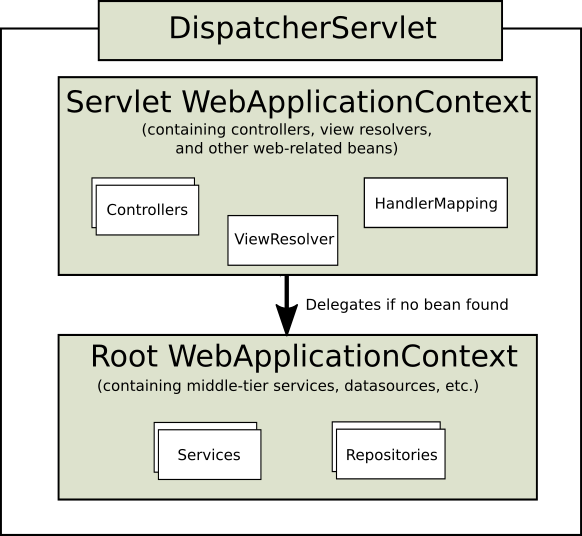
spring 的 web 框架围绕 DispatcherServlet [调度 servlet ]来设计的
DispatcherServlet DispatcherServlet的作用是将请求分发到不同的处理器。从spring2.5开始,使用Java5+的用户可以采用基于注解的controller声明方式
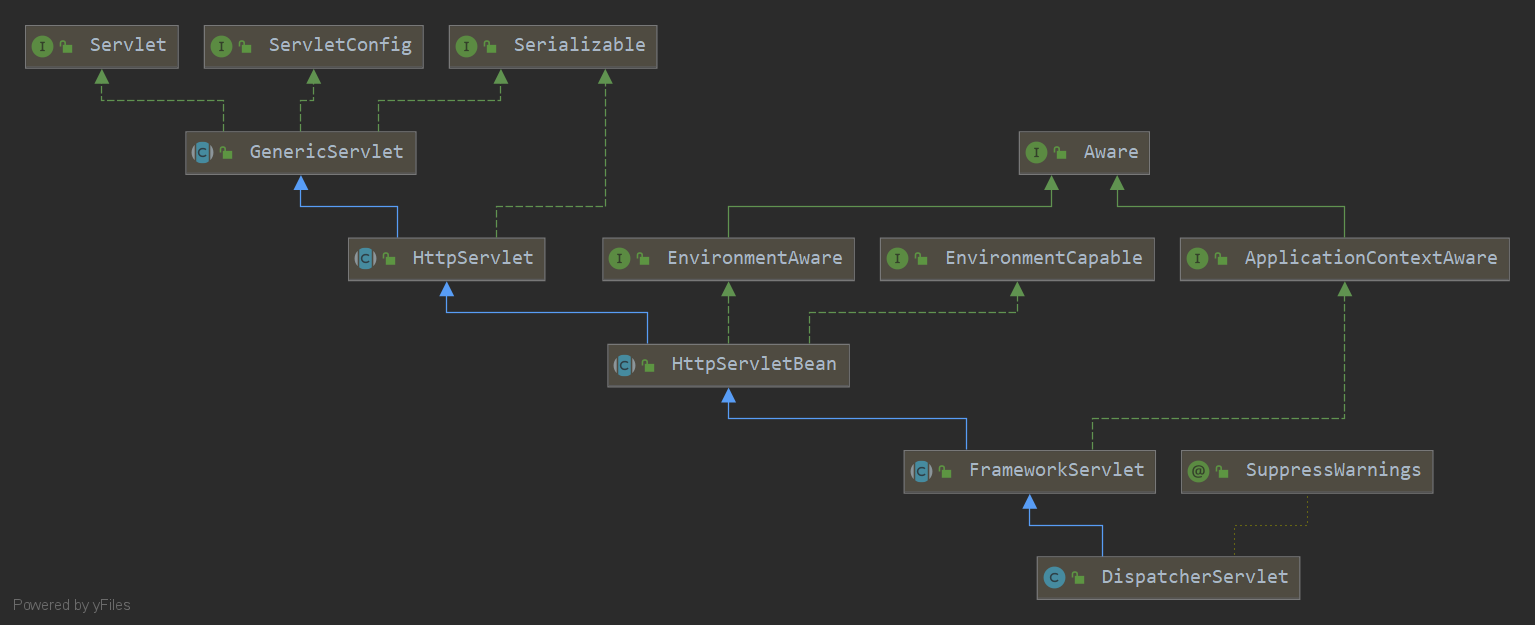
springmvc框架和其他mvc框架一样,以请求为驱动,围绕一个中心servlet分派请求及提供其他功能,dispatcherServlet也是一个servlet,它继承自HttpServlet基类
springmvc的原理如下图所示:
当发起请求时被前端控制器(DispatcherServlet)拦截到请求,根据请求参数生成代理请求,找到请求对应的controller,controller处理请求,创建数据模型,访问数据库,将模型响应给中心控制器,controller使用modelandview渲染视图结果,将结果返回给前端控制器,前端控制器将结果返回给请求者。
假设请求的url为:http://localhost:8080/SpringMVC/hello,把该url拆分为3个部分
http://localhost:8080 是服务器域名SpringMVC是部署在服务器上的web站点
hello表示控制器
通过分析,如上的url表示为:请求位于服务器localhost:8080上的SpringMVC站点的hello控制器
简要分析执行流程:
DispatcherServlet表示前端控制器,是整个springmvc的控制中心。用户发出请求,DispatcherServlet接收请求并拦截请求
HandlerMapping 为处理器映射器,由DispatcherServlet调用。HandlerMapping根据请求url查找Handler(处理器)
HandlerExecutation表示具体的Handler,其主要作用是根据url查找控制器,如上的url查找的控制器为hello
HandlerExecutation 将解析后的信息传递给DispatcherServlet,如解析控制器映射等
HandlerAdapter 表示处理器适配器,其按照特定的规则去执行Handler
Handler 让具体的Controller执行
Controller 将具体的执行信息返回给 HandlerAdapter,如 ModelAndView
HandlerAdapter 将视图逻辑名或模型传递给 DispatcherServlet
DispatcherServlet 调用视图解析器 (ViewResolver) 来解析 HandlerAdapter 传递的逻辑视图名
视图解析器将解析的逻辑视图名传给DispatcherServlet
DispatcherServlet 根据视图解析器解析的视图结果,调用具体的视图
最终视图呈现给用户
HelloSpringMVC
新建一个moudle,添加web依赖
确定导入了springmvc的依赖
配置web.xml,注册DispatcherServlet
1
2
3
4
5
6
7
8
9
10
11
12
13
14
15
16
17
18
19
20
21
22
23
24
25
26
27
28
<?xml version="1.0" encoding="UTF-8"?> <web-app xmlns ="http://xmlns.jcp.org/xml/ns/javaee" xmlns:xsi ="http://www.w3.org/2001/XMLSchema-instance" xsi:schemaLocation ="http://xmlns.jcp.org/xml/ns/javaee http://xmlns.jcp.org/xml/ns/javaee/web-app_4_0.xsd" version ="4.0" > <servlet > <servlet-name > springmvc</servlet-name > <servlet-class > org.springframework.web.servlet.DispatcherServlet</servlet-class > <init-param > <param-name > contextConfigLocation</param-name > <param-value > classpath:springmvc-servlet.xml</param-value > </init-param > <load-on-startup > 1</load-on-startup > </servlet > <servlet-mapping > <servlet-name > springmvc</servlet-name > <url-pattern > /*</url-pattern > </servlet-mapping > </web-app >
配置 Springmvc: springmvc-servlet.xml
1
2
3
4
5
6
7
8
9
10
11
12
13
14
15
16
<?xml version="1.0" encoding="UTF-8"?> <beans xmlns ="http://www.springframework.org/schema/beans" xmlns:xsi ="http://www.w3.org/2001/XMLSchema-instance" xsi:schemaLocation ="http://www.springframework.org/schema/beans http://www.springframework.org/schema/beans/spring-beans.xsd" > <bean class ="org.springframework.web.servlet.handler.BeanNameUrlHandlerMapping" /> <bean class ="org.springframework.web.servlet.mvc.SimpleControllerHandlerAdapter" /> <bean class ="org.springframework.web.servlet.view.InternalResourceViewResolver" > <property name ="prefix" value ="/WEB-INF/jsp/" /> <property name ="suffix" value =".jsp" /> </bean > </beans >
编写操作业务的Controller,要么实现Controller接口,要么添加注解;需要返回一个ModelAndView,装数据,封视图
1
2
3
4
5
6
7
8
9
10
11
12
public class HelloController implements Controller public ModelAndView handleRequest (HttpServletRequest request, HttpServletResponse response) throws Exception ModelAndView modelAndView = new ModelAndView(); String result = "Hello SpringMVC" ; modelAndView.addObject("msg" , result); modelAndView.setViewName("test" ); return modelAndView; } }
注册 bean 到 Spring IOC 容器
1 <bean id ="/hello" class ="com.cp.controller.HelloController" />
编写要跳转的 jsp 页面,显示 ModelAndView 存放的数据和我们正常的页面
1
2
3
4
5
6
7
8
9
<%@ page contentType="text/html;charset=UTF-8" language="java" %> <html> <head> <title>Title</title> </head> <body> ${msg} </body> </html>
配置tomcat,启动测试
使用注解开发
导入相关jar包
由于maven可能存在资源过滤的问题,我们将配置完善
1 2 3 4 5 6 7 8 9 10 11 12 13 14 15 16 17 18 19 20 <build > <resources > <resource > <directory > src/main/java</directory > <includes > <include > **/*.properties</include > <include > **/*.xml</include > </includes > <filtering > false</filtering > </resource > <resource > <directory > src/main/resources</directory > <includes > <include > **/*.properties</include > <include > **/*.xml</include > </includes > <filtering > false</filtering > </resource > </resources > </build >
在pom文件中引入相关依赖
配置web.xml
注册DispatcherServlet
管理SpringMVC配置文件
启动级别为1
映射路径为/
在resources目录下添加springmvc-servlet.xml配置文件
配置形式与springmvc容器配置基本类似,为了支持基于注解的ioc,设置了自动扫描包的功能,具体的配置如下:
1
2
3
4
5
6
7
8
9
10
11
12
13
14
15
16
17
18
19
20
21
22
23
24
<?xml version="1.0" encoding="UTF-8"?> <beans xmlns ="http://www.springframework.org/schema/beans" xmlns:xsi ="http://www.w3.org/2001/XMLSchema-instance" xmlns:mvc ="http://www.springframework.org/schema/mvc" xmlns:context ="http://www.springframework.org/schema/context" xsi:schemaLocation ="http://www.springframework.org/schema/beans http://www.springframework.org/schema/beans/spring-beans-4.2.xsd http://www.springframework.org/schema/mvc https://www.springframework.org/schema/mvc/spring-mvc.xsd http://www.springframework.org/schema/context https://www.springframework.org/schema/context/spring-context.xsd" > <context:component-scan base-package ="com.cp.controller" /> <mvc:default-servlet-handler /> <mvc:annotation-driven /> <bean class ="org.springframework.web.servlet.view.InternalResourceViewResolver" id ="internalResourceViewResolver" > <property name ="prefix" value ="/WEB-INF/jsp/" /> <property name ="suffix" value =".jsp" /> </bean > </beans >
在视图解析器中我们把所有的视图都存放在/WEB_INF/目录下,这样可以保证视图安全,因为这个目录下的文件,客户端不能直接访问。
创建controller
编写一个Java控制类,com.cp.HelloController, 注意编码规范
1
2
3
4
5
6
7
8
9
10
11
12
13
import org.springframework.stereotype.Controller;import org.springframework.ui.Model;import org.springframework.web.bind.annotation.RequestMapping;@Controller public class HelloController @RequestMapping("/hello") public String hello (Model model) model.addAttribute("msg" , "chenpeng" ); return "hello" ; } }
@Controller 是为了让spring ioc容器初始化时自动扫描到
@RequestMapping 是为了映射请求路径,如果类上也有该注解且参数为 /HelloController,所以访问的时候应该是/HelloController/hello
方法声明中Model类型是为了把Action中的数据带到视图
方法返回的结果是视图的名称hello,加上配置文件中的前缀和后缀变为/WEB-INF/jsp/hello
创建视图层
在/WEB-INF/jsp目录下创建hello.jsp,视图可以直接指出并展示从Controller带回的信息,可以通过EL表示取出Model中存放的值,或者对象
1
2
3
4
5
6
7
8
9
<%@ page contentType="text/html;charset=UTF-8" language="java" %> <html> <head> <title>Title</title> </head> <body> ${msg} </body> </html>
配置tomcat运行
小结 使用springmvc必须配置的三大件:
处理器映射器
处理器适配器
视图解析器
通常,我们只需要手动配置视图解析器,而处理器映射器和处理器适配器只需要开启注解驱动即可,省去了大量xml配置。
Controller和Restful风格 控制器Controller
控制器复杂提供访问应用程序的行为,通常通过接口定义或注解定义两种方法实现
控制器负责解析用户的请求并将其转换为一个模型
在springmvc中一个控制器类可以包含多个方法
在springmvc中,对于controller的配置可以有很多种
实现Controller接口 Controller是一个接口,在org.springframework.web.servlet.mvc.Controller 包下,接口只有一个方法
1
2
3
4
5
6
7
8
9
10
11
12
13
14
15
16
17
@FunctionalInterface public interface Controller @Nullable ModelAndView handleRequest (HttpServletRequest request, HttpServletResponse response) throws Exception ; }
RequestMapping @RequestMapping 注解用于映射url到控制器类或一个特定的处理程序方法,可用于类或者方法上。用于类上,表示类中的所有响应请求的方法都是以该地址作为父路径。
1
2
3
4
5
6
7
8
9
10
11
12
13
14
15
16
17
18
19
20
21
22
23
24
25
26
27
28
29
30
31
32
33
34
35
36
37
``` 请求的地址为 ### Restful风格 Restful就是资源定位及资源操作的风格,不是标准也不是协议,只是一种风格。基于这个风格设计的软件可以更简洁,更有层次,更易于实现缓存等机制 资源:互联网上所有的事物都可以抽象为资源 资源操作:使用post、delet、put、get等不同方法对资源进行操作 分别对应增删改查 传统方式操作资源:通过不同的参数来实现不同的效果!方法单一,post和get http: http: http: http: 使用Restful风格操作资源:通过不同的请求方式实现不同的效果!如下:请求地址一样,但是功能不同 http: http: http: http: 新建一个类 RestfulController ```java
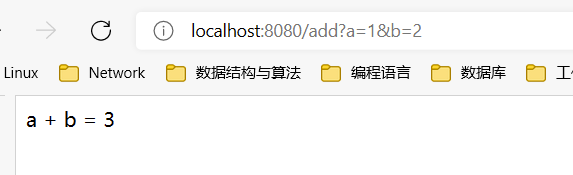
http://localhost:8080/add?a=1&b=2
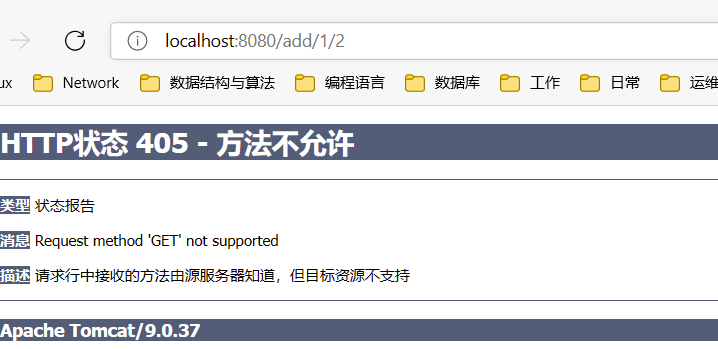
使用@PathVariable,让方法参数的值对应绑定到一个url模板变量上
1
2
3
4
5
6
7
8
9
10
11
```  可以限定请求方法 ```java
1
2
3
4
5
6
7
8
9
```  使用更精简的方式 ```java
使用路径变量的好处:
使路径变得更加简洁
获得参数更加方便,框架会自动进行类型转换
通过路径变量的类型可以约束访问参数,如果类型不一样,则访问不到对应的请求方法
重定向和转发 设置ModelAndView对象,更具view 的名称,和视图解析器跳到指定的页面。
页面:{视图解析器前缀} + viewName + {视图解析器后缀}
1
2
3
4
5
6
7
8
9
10
11
12
13
14
15
16
17
18
``` 对应的Controller类 ```java public class HelloController implements Controller { public ModelAndView handleRequest(HttpServletRequest request, HttpServletResponse response) throws Exception { ModelAndView modelAndView = new ModelAndView(); // 业务代码 String result = "Hello SpringMVC"; modelAndView.addObject("msg", result); // 视图跳转 modelAndView.setViewName("test"); return modelAndView; } }
通过 ServletAPI 通过设置ServletAPI,不需要视图解析器
通过HttpServletResponse 进行输出
通过HttpServletRequest 实现重定向
通过HttpServletRequest 实现转发
1
2
3
4
5
6
7
8
9
10
11
12
13
14
15
16
17
18
@Controller public class ServletAPITest @RequestMapping("/servlet/t1") public void test01 (HttpServletRequest request, HttpServletResponse response) throws IOException response.getWriter().println("Hello, Spring by ServletAPI" ); } @RequestMapping("/servlet/t2") public void test02 (HttpServletRequest request, HttpServletResponse response) throws IOException response.sendRedirect("index.jsp" ); } @RequestMapping("/servlet/t3") public void test03 (HttpServletRequest request, HttpServletResponse response) throws IOException, ServletException request.setAttribute("msg" , "/servlet/t3" ); request.getRequestDispatcher("/WEB-INF/jsp.test.jsp" ).forward(request, response); } }
通过SpringMVC 通过SpringMVC实现重定向和转发–无需视图解析器
1
2
3
4
5
6
7
8
9
10
11
12
13
14
15
16
17
18
19
``` ## 数据处理 ### 处理提交数据 提交的域名称和处理方法的参数名称一致 提交数据:http: 处理方法: ```java @GetMapping("/hello/t1") public String test01 (String name, Model model) System.out.println("receive data: " + name); model.addAttribute("name" , name); return "hello" ; }
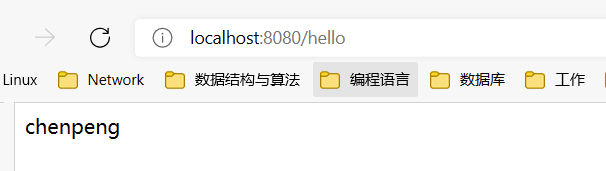
后台输出:chenpeng
提交的域名称和处理方法的参数名称不一致
提交数据:http://localhost:8080/hello?username=chenpeng
通过@RequestParam注解
1
2
3
4
5
6
@GetMapping("/hello/t2") public String test02 (@RequestParam("username") String name, Model model) System.out.println("receive data: " + name); model.addAttribute("name" , name); return "hello" ; }
建议:只要是从前端传来的参数,都建议加上@RequestParam注解用来标明。
前端接受的使一个对象
接收前端传来的参数,判断参数的名称,如果名称和方法参数名称相同,可以直接使用
如果传递的使一个对象,会匹配对象中的字段名,如果名称一致则🆗,否则匹配不到
提交数据:http://localhost:8080/user/t3?id=1&name=chenpeng&age=18
我们的User类包含3个属性
1
2
3
private int id;private String name;private int age;
处理方法
1
2
3
4
5
6
@GetMapping("/user/t3") public String test03(User user, Model model) { System.out.println("receive data: " + user.toString()); model.addAttribute("name", user.getName()); return "hello"; }
控制台输出结果:
1 receive data: User{id=1, name='chenpeng', age=18}
注意:传递的参数名称必须和对象中的字段名称一致
数据显示到前端 通过ModelAndView
1
2
3
4
5
6
7
8
9
10
11
12
13
public class HelloController implements Controller public ModelAndView handleRequest (HttpServletRequest request, HttpServletResponse response) throws Exception ModelAndView modelAndView = new ModelAndView(); String result = "Hello SpringMVC" ; modelAndView.addObject("msg" , result); modelAndView.setViewName("test" ); return modelAndView; } }
通过ModelMap
1
2
3
4
5
6
7
public class DataOptController @GetMapping("/user/t4") public String test04 (ModelMap map) map.addAttribute("name " , "chenpeng" ); return "hello" ; } }
通过Model
1
2
3
4
5
6
7
8
public class DataOptController @GetMapping("/user/t1") public String test01 (String name, Model model) System.out.println("receive data: " + name); model.addAttribute("name" , name); return "hello" ; } }
对比:
model:只有几个方法适用于存储数据,简化了新手对于Model对象的操作和理解
ModelMap:继承自LinkedMap,除了实现自身的方法,同样继承了LinkedMap的方法和特性
ModelAndView:可以在存储数据的同时,进行设置返回的逻辑视图,进而控制展示层的跳转
以后的开发主要考虑的是性能和优化
乱码问题 1 2 3 4 <form name="test" method="post" action="/user/t1" > <input type="text" name="name" > <input type="submit" > </form>
自定义Controller
1 2 3 4 5 6 7 8 9 10 11 12 13 14 15 ```    通过过滤器解决乱码 自定义过滤器类 ```java
web.xml 中注册过滤器
1 2 3 4 5 6 7 8 9 10 11 ``` <url-pattern > /</url-pattern > 只能解决get方法,post还是乱码<url-pattern > /*</url-pattern > 即可解决问题它们的区别是:/*过滤页面和请求,/只过滤请求 使用springmvc提供的过滤器,可以在web.xml中配置 ```xml
极端情况下:检查tomcat编码 conf\server.xml
1 2 3 4 <Connector port ="8080" protocol ="HTTP/1.1" connectionTimeout ="20000" redirectPort ="8443" URIEncoding ="utf-8" />
更极端:自定义filter类
1 2 3 4 5 6 7 8 9 10 11 12 13 14 15 16 17 18 19 20 21 22 23 24 25 26 ``` ## 理解Json Json (JavaScript Object Notation,JS对象标记) 是一种轻量级的数据交换格式,使用广泛采用完全独立于编程语言的文本格式来存储和表示数据 简洁和清晰的层次结构使得Json成为理想的数据交换语言 易于人的阅读和编写,同时也易于机器解析和生成,并有效地提升网络传输效率 在JavaScript语言中,一切都是对象,任何JavaScript支持的类型都可以通过JSON来表示,例如字符串、数字、对象、数组等。 对象表示为键值对,数据由逗号分隔 花括号保存对象 方括号保存数组 JSON键值对是用来保存JavaScript对象的一种方式,和JavaScript对象的写法相似,键/值对组合中的键名卸载前面并用双引号""包裹,使用冒号:分隔,然后是值: ```json "name" : "chenpeng" }{"age" : 18 } {"gender" : "男" }
可以这么理解:
JSON是JavaScript对象的字符串表示法,它使用文本表示一个JS对象的信息,本质上是一个字符串
1 2 var obj = {a : "hello" , b : "world" }; var json = "{" a": " hello", " b": " world"}" ;
JSON和JavaScript对象互转 使用JSON.parse() 方法将JSON字符串转换为JavaScript对象
1 var obj = JSON .parse("{" a": " hello", " b": " world"}" );
使用JSON.stringify() 方法将JavaScript对象转换为字符串
1 var json = JSON .stringify({a : "hello" , b : "world" });
前后端分离:
后端部署后端,提供接口,提供数据
前端独立部署,渲染后端的数据
Controller返回JSON数据 Jackson是目前比较好的json解析工具,另外还有阿里的fastjson
使用Jackson,需要导入其依赖包
1 2 3 4 5 6 <dependency > <groupId > com.fasterxml.jackson.core</groupId > <artifactId > jackson-databind</artifactId > <version > 2.12.4</version > </dependency >
配置springmvc配置
web.xml
1 2 3 4 5 6 7 8 9 10 11 12 13 14 15 16 17 18 19 20 21 22 23 24 25 26 27 28 29 30 31 32 33 <?xml version="1.0" encoding="UTF-8"?> <web-app xmlns ="http://xmlns.jcp.org/xml/ns/javaee" xmlns:xsi ="http://www.w3.org/2001/XMLSchema-instance" xsi:schemaLocation ="http://xmlns.jcp.org/xml/ns/javaee http://xmlns.jcp.org/xml/ns/javaee/web-app_4_0.xsd" version ="4.0" > <servlet > <servlet-name > dispatcher</servlet-name > <servlet-class > org.springframework.web.servlet.DispatcherServlet</servlet-class > <init-param > <param-name > contextConfigLocation</param-name > <param-value > classpath:springmvc-servlet.xml</param-value > </init-param > <load-on-startup > 1</load-on-startup > </servlet > <servlet-mapping > <servlet-name > dispatcher</servlet-name > <url-pattern > /</url-pattern > </servlet-mapping > <filter > <filter-name > encoding</filter-name > <filter-class > org.springframework.web.filter.CharacterEncodingFilter</filter-class > <init-param > <param-name > encoding</param-name > <param-value > utf-8</param-value > </init-param > </filter > <filter-mapping > <filter-name > encoding</filter-name > <url-pattern > /*</url-pattern > </filter-mapping > </web-app >
springmvc-servlet.xml
1 2 3 4 5 6 7 8 9 10 11 12 13 14 15 16 17 <?xml version="1.0" encoding="UTF-8"?> <beans xmlns ="http://www.springframework.org/schema/beans" xmlns:xsi ="http://www.w3.org/2001/XMLSchema-instance" xmlns:context ="http://www.springframework.org/schema/context" xsi:schemaLocation ="http://www.springframework.org/schema/beans http://www.springframework.org/schema/beans/spring-beans-4.2.xsd http://www.springframework.org/schema/context https://www.springframework.org/schema/context/spring-context.xsd" > <context:component-scan base-package ="com.cp.controller" /> <bean class ="org.springframework.web.servlet.view.InternalResourceViewResolver" id ="internalResourceViewResolver" > <property name ="prefix" value ="/WEB-INF/jsp/" /> <property name ="suffix" value =".jsp" /> </bean > </beans >
编写一个实体类User
1 2 3 4 5 6 7 public class User private String name; private int age; private String gender; }
编写Controller
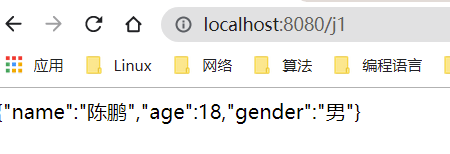
1 2 3 4 5 6 7 8 9 10 11 12 13 14 ``` 配置tomcat启动测试  出现乱码问题,设置一下编码格式为utf-8 ,以及它返回的类型 通过@RequestMapping 中的produce属性来实现,修改下代码 ```java @RequestMapping(value = "/j1", produces = "application/json;charset=utf-8")
乱码统一解决:
在springmvc-servlet.xml中加入以下配置
1 2 3 4 5 6 7 8 9 10 11 12 13 14 <mvc:annotation-driven > <mvc:message-converters register-defaults ="true" > <bean class ="org.springframework.http.converter.StringHttpMessageConverter" > <constructor-arg value ="utf-8" /> </bean > <bean class ="org.springframework.http.converter.json.MappingJackson2HttpMessageConverter" > <property name ="objectMapper" > <bean class ="org.springframework.http.converter.json.Jackson2ObjectMapperFactoryBean" > <property name ="failOnEmptyBeans" value ="false" /> </bean > </property > </bean > </mvc:message-converters > </mvc:annotation-driven >
@Controller 默认走视图解析器,如果方法不走视图解析器,需要@RespondBody注解配合使用
@RestController 默认不走视图解析器
整合SSM 环境:
IDEA
MySQL 5.7.35
Tomcat 9
Maven 3.8.1
创建数据表 1 2 3 4 5 6 7 8 9 10 11 12 13 14 15 16 17 18 CREATE DATABASE `ssmbuild`;USE `ssmbuild`; DROP TABLE IF EXISTS `books`;CREATE TABLE `books` (`bookID` INT (10 ) NOT NULL AUTO_INCREMENT COMMENT '书id' , `bookName` VARCHAR (100 ) NOT NULL COMMENT '书名' , `bookCounts` INT (11 ) NOT NULL COMMENT '数量' , `detail` VARCHAR (200 ) NOT NULL COMMENT '描述' , KEY `bookID` (`bookID`) ) ENGINE= INNODB DEFAULT CHARSET= utf8 INSERT INTO `books`(`bookID`,`bookName`,`bookCounts`,`detail`)VALUES (1 ,'Java' ,1 ,'从入门到放弃' ), (2 ,'MySQL' ,10 ,'从删库到跑路' ), (3 ,'Linux' ,5 ,'从进门到进牢' );
基本环境搭建 新建一Maven项目!ssmbuild , 添加web的支持
导入相关的pom依赖!
1 2 3 4 5 6 7 8 9 10 11 12 13 14 15 16 17 18 19 20 21 22 23 24 25 26 27 28 29 30 31 32 33 34 35 36 37 38 39 40 41 42 43 44 45 46 47 48 49 50 51 52 53 54 55 56 57 58 59 60 61 <dependencies > <dependency > <groupId > junit</groupId > <artifactId > junit</artifactId > <version > 4.12</version > </dependency > <dependency > <groupId > mysql</groupId > <artifactId > mysql-connector-java</artifactId > <version > 5.1.47</version > </dependency > <dependency > <groupId > com.mchange</groupId > <artifactId > c3p0</artifactId > <version > 0.9.5.2</version > </dependency > <dependency > <groupId > javax.servlet</groupId > <artifactId > servlet-api</artifactId > <version > 2.5</version > </dependency > <dependency > <groupId > javax.servlet.jsp</groupId > <artifactId > jsp-api</artifactId > <version > 2.2</version > </dependency > <dependency > <groupId > javax.servlet</groupId > <artifactId > jstl</artifactId > <version > 1.2</version > </dependency > <dependency > <groupId > org.mybatis</groupId > <artifactId > mybatis</artifactId > <version > 3.5.2</version > </dependency > <dependency > <groupId > org.mybatis</groupId > <artifactId > mybatis-spring</artifactId > <version > 2.0.2</version > </dependency > <dependency > <groupId > org.springframework</groupId > <artifactId > spring-webmvc</artifactId > <version > 5.1.9.RELEASE</version > </dependency > <dependency > <groupId > org.springframework</groupId > <artifactId > spring-jdbc</artifactId > <version > 5.1.9.RELEASE</version > </dependency > </dependencies >
Maven资源过滤设置
1 2 3 4 5 6 7 8 9 10 11 12 13 14 15 16 17 18 19 20 <build > <resources > <resource > <directory > src/main/java</directory > <includes > <include > **/*.properties</include > <include > **/*.xml</include > </includes > <filtering > false</filtering > </resource > <resource > <directory > src/main/resources</directory > <includes > <include > **/*.properties</include > <include > **/*.xml</include > </includes > <filtering > false</filtering > </resource > </resources > </build >
建立基本结构和配置框架!
com.chenpeng.pojo
com.chenpeng.dao
com.chenpeng.service
com.chenpeng.controller
mybatis-config.xml
1 2 3 4 5 6 7 <?xml version="1.0" encoding="UTF-8" ?> <!DOCTYPE configuration PUBLIC "-//mybatis.org//DTD Config 3.0//EN" "http://mybatis.org/dtd/mybatis-3-config.dtd" > <configuration > </configuration >
applicationContext.xml
1 2 3 4 5 6 7 <?xml version="1.0" encoding="UTF-8"?> <beans xmlns ="http://www.springframework.org/schema/beans" xmlns:xsi ="http://www.w3.org/2001/XMLSchema-instance" xsi:schemaLocation ="http://www.springframework.org/schema/beans http://www.springframework.org/schema/beans/spring-beans.xsd" ></beans >
Mybatis层编写 1、数据库配置文件 database.properties
1 2 3 4 jdbc.driver =com.mysql.jdbc.Driver jdbc.url =jdbc:mysql://localhost:3306/ssmbuild?useSSL=true&useUnicode=true&characterEncoding=utf8 jdbc.username =root jdbc.password =123456
2、IDEA关联数据库
3、编写MyBatis的核心配置文件
1 2 3 4 5 6 7 8 9 10 11 12 13 14 <?xml version="1.0" encoding="UTF-8" ?> <!DOCTYPE configuration PUBLIC "-//mybatis.org//DTD Config 3.0//EN" "http://mybatis.org/dtd/mybatis-3-config.dtd" > <configuration > <typeAliases > <package name ="com.kuang.pojo" /> </typeAliases > <mappers > <mapper resource ="com/kuang/dao/BookMapper.xml" /> </mappers > </configuration >
4、编写数据库对应的实体类 com.chenpeng.pojo.Books
使用lombok插件!
1 2 3 4 5 6 7 8 9 10 11 12 13 14 15 16 17 package com.kuang.pojo;import lombok.AllArgsConstructor;import lombok.Data;import lombok.NoArgsConstructor;@Data @AllArgsConstructor @NoArgsConstructor public class Books private int bookID; private String bookName; private int bookCounts; private String detail; }
5、编写Dao层的 Mapper接口!
1 2 3 4 5 6 7 8 9 10 11 12 13 14 15 16 17 18 19 20 21 22 23 package com.kuang.dao;import com.kuang.pojo.Books;import java.util.List;public interface BookMapper int addBook (Books book) int deleteBookById (int id) int updateBook (Books books) Books queryBookById (int id) ; List<Books> queryAllBook () ; }
6、编写接口对应的 Mapper.xml 文件。需要导入MyBatis的包;
1 2 3 4 5 6 7 8 9 10 11 12 13 14 15 16 17 18 19 20 21 22 23 24 25 26 27 28 29 30 31 32 33 34 35 36 37 <?xml version="1.0" encoding="UTF-8" ?> <!DOCTYPE mapper PUBLIC "-//mybatis.org//DTD Mapper 3.0//EN" "http://mybatis.org/dtd/mybatis-3-mapper.dtd" > <mapper namespace ="com.kuang.dao.BookMapper" > <insert id ="addBook" parameterType ="Books" > insert into ssmbuild.books(bookName,bookCounts,detail) values (#{bookName}, #{bookCounts}, #{detail}) </insert > <delete id ="deleteBookById" parameterType ="int" > delete from ssmbuild.books where bookID=#{bookID} </delete > <update id ="updateBook" parameterType ="Books" > update ssmbuild.books set bookName = #{bookName},bookCounts = #{bookCounts},detail = #{detail} where bookID = #{bookID} </update > <select id ="queryBookById" resultType ="Books" > select * from ssmbuild.books where bookID = #{bookID} </select > <select id ="queryAllBook" resultType ="Books" > SELECT * from ssmbuild.books </select > </mapper >
7、编写Service层的接口和实现类
接口:
1 2 3 4 5 6 7 8 9 10 11 12 13 14 15 16 17 18 19 package com.kuang.service;import com.kuang.pojo.Books;import java.util.List;public interface BookService int addBook (Books book) int deleteBookById (int id) int updateBook (Books books) Books queryBookById (int id) ; List<Books> queryAllBook () ; }
编写实现类
1 2 3 4 5 6 7 8 9 10 11 12 13 14 15 16 17 18 19 20 21 22 23 24 25 26 27 28 29 30 31 32 33 34 35 package com.kuang.service;import com.kuang.dao.BookMapper;import com.kuang.pojo.Books;import java.util.List;public class BookServiceImpl implements BookService private BookMapper bookMapper; public void setBookMapper (BookMapper bookMapper) this .bookMapper = bookMapper; } public int addBook (Books book) return bookMapper.addBook(book); } public int deleteBookById (int id) return bookMapper.deleteBookById(id); } public int updateBook (Books books) return bookMapper.updateBook(books); } public Books queryBookById (int id) return bookMapper.queryBookById(id); } public List<Books> queryAllBook () return bookMapper.queryAllBook(); } }
OK,到此,底层需求操作编写完毕!
Spring层 1、配置Spring整合MyBatis ,我们这里数据源使用c3p0连接池;
2、我们去编写Spring整合Mybatis的相关的配置文件;spring-dao.xml
1 2 3 4 5 6 7 8 9 10 11 12 13 14 15 16 17 18 19 20 21 22 23 24 25 26 27 28 29 30 31 32 33 34 35 36 37 38 39 40 41 42 43 44 45 46 47 48 49 50 51 52 53 54 <?xml version="1.0" encoding="UTF-8"?> <beans xmlns ="http://www.springframework.org/schema/beans" xmlns:xsi ="http://www.w3.org/2001/XMLSchema-instance" xmlns:context ="http://www.springframework.org/schema/context" xsi:schemaLocation ="http://www.springframework.org/schema/beans http://www.springframework.org/schema/beans/spring-beans.xsd http://www.springframework.org/schema/context https://www.springframework.org/schema/context/spring-context.xsd" > <context:property-placeholder location ="classpath:database.properties" /> <bean id ="dataSource" class ="com.mchange.v2.c3p0.ComboPooledDataSource" > <property name ="driverClass" value ="${jdbc.driver}" /> <property name ="jdbcUrl" value ="${jdbc.url}" /> <property name ="user" value ="${jdbc.username}" /> <property name ="password" value ="${jdbc.password}" /> <property name ="maxPoolSize" value ="30" /> <property name ="minPoolSize" value ="10" /> <property name ="autoCommitOnClose" value ="false" /> <property name ="checkoutTimeout" value ="10000" /> <property name ="acquireRetryAttempts" value ="2" /> </bean > <bean id ="sqlSessionFactory" class ="org.mybatis.spring.SqlSessionFactoryBean" > <property name ="dataSource" ref ="dataSource" /> <property name ="configLocation" value ="classpath:mybatis-config.xml" /> </bean > <bean class ="org.mybatis.spring.mapper.MapperScannerConfigurer" > <property name ="sqlSessionFactoryBeanName" value ="sqlSessionFactory" /> <property name ="basePackage" value ="com.kuang.dao" /> </bean > </beans >
3、Spring整合service层
1 2 3 4 5 6 7 8 9 10 11 12 13 14 15 16 17 18 19 20 21 22 23 24 <?xml version="1.0" encoding="UTF-8"?> <beans xmlns ="http://www.springframework.org/schema/beans" xmlns:xsi ="http://www.w3.org/2001/XMLSchema-instance" xmlns:context ="http://www.springframework.org/schema/context" xsi:schemaLocation ="http://www.springframework.org/schema/beans http://www.springframework.org/schema/beans/spring-beans.xsd http://www.springframework.org/schema/context http://www.springframework.org/schema/context/spring-context.xsd" > <context:component-scan base-package ="com.kuang.service" /> <bean id ="BookServiceImpl" class ="com.kuang.service.BookServiceImpl" > <property name ="bookMapper" ref ="bookMapper" /> </bean > <bean id ="transactionManager" class ="org.springframework.jdbc.datasource.DataSourceTransactionManager" > <property name ="dataSource" ref ="dataSource" /> </bean > </beans >
Spring层搞定!再次理解一下,Spring就是一个大杂烩,一个容器!对吧!
SpringMVC层 1、web.xml
1 2 3 4 5 6 7 8 9 10 11 12 13 14 15 16 17 18 19 20 21 22 23 24 25 26 27 28 29 30 31 32 33 34 35 36 37 38 39 40 41 42 43 44 <?xml version="1.0" encoding="UTF-8"?> <web-app xmlns ="http://xmlns.jcp.org/xml/ns/javaee" xmlns:xsi ="http://www.w3.org/2001/XMLSchema-instance" xsi:schemaLocation ="http://xmlns.jcp.org/xml/ns/javaee http://xmlns.jcp.org/xml/ns/javaee/web-app_4_0.xsd" version ="4.0" > <servlet > <servlet-name > DispatcherServlet</servlet-name > <servlet-class > org.springframework.web.servlet.DispatcherServlet</servlet-class > <init-param > <param-name > contextConfigLocation</param-name > <param-value > classpath:applicationContext.xml</param-value > </init-param > <load-on-startup > 1</load-on-startup > </servlet > <servlet-mapping > <servlet-name > DispatcherServlet</servlet-name > <url-pattern > /</url-pattern > </servlet-mapping > <filter > <filter-name > encodingFilter</filter-name > <filter-class > org.springframework.web.filter.CharacterEncodingFilter </filter-class > <init-param > <param-name > encoding</param-name > <param-value > utf-8</param-value > </init-param > </filter > <filter-mapping > <filter-name > encodingFilter</filter-name > <url-pattern > /*</url-pattern > </filter-mapping > <session-config > <session-timeout > 15</session-timeout > </session-config > </web-app >
2、spring-mvc.xml
1 2 3 4 5 6 7 8 9 10 11 12 13 14 15 16 17 18 19 20 21 22 23 24 25 26 27 28 29 <?xml version="1.0" encoding="UTF-8"?> <beans xmlns ="http://www.springframework.org/schema/beans" xmlns:xsi ="http://www.w3.org/2001/XMLSchema-instance" xmlns:context ="http://www.springframework.org/schema/context" xmlns:mvc ="http://www.springframework.org/schema/mvc" xsi:schemaLocation ="http://www.springframework.org/schema/beans http://www.springframework.org/schema/beans/spring-beans.xsd http://www.springframework.org/schema/context http://www.springframework.org/schema/context/spring-context.xsd http://www.springframework.org/schema/mvc https://www.springframework.org/schema/mvc/spring-mvc.xsd" > <mvc:annotation-driven /> <mvc:default-servlet-handler /> <bean class ="org.springframework.web.servlet.view.InternalResourceViewResolver" > <property name ="viewClass" value ="org.springframework.web.servlet.view.JstlView" /> <property name ="prefix" value ="/WEB-INF/jsp/" /> <property name ="suffix" value =".jsp" /> </bean > <context:component-scan base-package ="com.kuang.controller" /> </beans >
3、Spring配置整合文件,applicationContext.xml
1 2 3 4 5 6 7 8 9 10 11 <?xml version="1.0" encoding="UTF-8"?> <beans xmlns ="http://www.springframework.org/schema/beans" xmlns:xsi ="http://www.w3.org/2001/XMLSchema-instance" xsi:schemaLocation ="http://www.springframework.org/schema/beans http://www.springframework.org/schema/beans/spring-beans.xsd" > <import resource ="spring-dao.xml" /> <import resource ="spring-service.xml" /> <import resource ="spring-mvc.xml" /> </beans >
配置文件,暂时结束!Controller 和 视图层编写
1、BookController 类编写 , 方法一:查询全部书籍
1 2 3 4 5 6 7 8 9 10 11 12 13 14 15 @Controller @RequestMapping("/book") public class BookController @Autowired @Qualifier("BookServiceImpl") private BookService bookService; @RequestMapping("/allBook") public String list (Model model) List<Books> list = bookService.queryAllBook(); model.addAttribute("list" , list); return "allBook" ; } }
2、编写首页 index.jsp
1 2 3 4 5 6 7 8 9 10 11 12 13 14 15 16 17 18 19 20 21 22 23 24 25 26 27 28 29 <%@ page language="java" contentType="text/html; charset=UTF-8" pageEncoding="UTF-8" %> <!DOCTYPE HTML> <html> <head> <title>首页</title> <style type="text/css" > a { text-decoration: none; color: black; font-size: 18px; } h3 { width: 180px; height: 38px; margin: 100px auto; text-align: center; line-height: 38px; background: deepskyblue; border-radius: 4px; } </style> </head> <body> <h3> <a href="${pageContext.request.contextPath}/book/allBook" >点击进入列表页</a> </h3> </body> </html>
3、书籍列表页面 allbook.jsp
1 2 3 4 5 6 7 8 9 10 11 12 13 14 15 16 17 18 19 20 21 22 23 24 25 26 27 28 29 30 31 32 33 34 35 36 37 38 39 40 41 42 43 44 45 46 47 48 49 50 51 52 53 54 55 56 57 58 59 60 <%@ taglib prefix="c" uri="http://java.sun.com/jsp/jstl/core" %> <%@ page contentType="text/html;charset=UTF-8" language="java" %> <html> <head> <title>书籍列表</title> <meta name="viewport" content="width=device-width, initial-scale=1.0" > <!-- 引入 Bootstrap --> <link href="https://cdn.bootcss.com/bootstrap/3.3.7/css/bootstrap.min.css" rel="stylesheet" > </head> <body> <div class "container" > <div class "row clearfix" > <div class "col-md-12 column" > <div class "page-header" > <h1> <small>书籍列表 —— 显示所有书籍</small> </h1> </div> </div> </div> <div class "row" > <div class "col-md-4 column" > <a class "btn btn-primary" href="${pageContext.request.contextPath}/book/toAddBook" >新增</a> </div> </div> <div class "row clearfix" > <div class "col-md-12 column" > <table class "table table-hover table-striped" > <thead> <tr> <th>书籍编号</th> <th>书籍名字</th> <th>书籍数量</th> <th>书籍详情</th> <th>操作</th> </tr> </thead> <tbody> <c:forEach var ="book" items="${requestScope.get('list')}" > <tr> <td>${book.getBookID()}</td> <td>${book.getBookName()}</td> <td>${book.getBookCounts()}</td> <td>${book.getDetail()}</td> <td> <a href="${pageContext.request.contextPath}/book/toUpdateBook?id=${book.getBookID()}" >更改</a> | <a href="${pageContext.request.contextPath}/book/del/${book.getBookID()}" >删除</a> </td> </tr> </c:forEach> </tbody> </table> </div> </div> </div>
4、BookController 类编写 , 方法二:添加书籍
1 2 3 4 5 6 7 8 9 10 11 @RequestMapping("/toAddBook") public String toAddPaper () return "addBook" ; } @RequestMapping("/addBook") public String addPaper (Books books) System.out.println(books); bookService.addBook(books); return "redirect:/book/allBook" ; }
5、添加书籍页面:addBook.jsp
1 2 3 4 5 6 7 8 9 10 11 12 13 14 15 16 17 18 19 20 21 22 23 24 25 26 27 28 29 30 <%@ taglib prefix="c" uri="http://java.sun.com/jsp/jstl/core" %> <%@ page contentType="text/html;charset=UTF-8" language="java" %> <html> <head> <title>新增书籍</title> <meta name="viewport" content="width=device-width, initial-scale=1.0" > <!-- 引入 Bootstrap --> <link href="https://cdn.bootcss.com/bootstrap/3.3.7/css/bootstrap.min.css" rel="stylesheet" > </head> <body> <div class "container" > <div class "row clearfix" > <div class "col-md-12 column" > <div class "page-header" > <h1> <small>新增书籍</small> </h1> </div> </div> </div> <form action="${pageContext.request.contextPath}/book/addBook" method="post" > 书籍名称:<input type="text" name="bookName" ><br><br><br> 书籍数量:<input type="text" name="bookCounts" ><br><br><br> 书籍详情:<input type="text" name="detail" ><br><br><br> <input type="submit" value="添加" > </form> </div>
6、BookController 类编写 , 方法三:修改书籍
1 2 3 4 5 6 7 8 9 10 11 12 13 14 15 16 @RequestMapping("/toUpdateBook") public String toUpdateBook (Model model, int id) Books books = bookService.queryBookById(id); System.out.println(books); model.addAttribute("book" ,books ); return "updateBook" ; } @RequestMapping("/updateBook") public String updateBook (Model model, Books book) System.out.println(book); bookService.updateBook(book); Books books = bookService.queryBookById(book.getBookID()); model.addAttribute("books" , books); return "redirect:/book/allBook" ; }
7、修改书籍页面 updateBook.jsp
1 2 3 4 5 6 7 8 9 10 11 12 13 14 15 16 17 18 19 20 21 22 23 24 25 26 27 28 29 30 31 <%@ taglib prefix="c" uri="http://java.sun.com/jsp/jstl/core" %> <%@ page contentType="text/html;charset=UTF-8" language="java" %> <html> <head> <title>修改信息</title> <meta name="viewport" content="width=device-width, initial-scale=1.0" > <!-- 引入 Bootstrap --> <link href="https://cdn.bootcss.com/bootstrap/3.3.7/css/bootstrap.min.css" rel="stylesheet" > </head> <body> <div class "container" > <div class "row clearfix" > <div class "col-md-12 column" > <div class "page-header" > <h1> <small>修改信息</small> </h1> </div> </div> </div> <form action="${pageContext.request.contextPath}/book/updateBook" method="post" > <input type="hidden" name="bookID" value="${book.getBookID()}" /> 书籍名称:<input type="text" name="bookName" value="${book.getBookName()}" /> 书籍数量:<input type="text" name="bookCounts" value="${book.getBookCounts()}" /> 书籍详情:<input type="text" name="detail" value="${book.getDetail() }" /> <input type="submit" value="提交" /> </form> </div>
8、BookController 类编写 , 方法四:删除书籍
1 2 3 4 5 @RequestMapping("/del/{bookId}") public String deleteBook (@PathVariable("bookId") int id) bookService.deleteBookById(id); return "redirect:/book/allBook" ; }
配置Tomcat,进行运行!
到目前为止,这个SSM项目整合已经完全的OK了,可以直接运行进行测试!这个练习十分的重要,大家需要保证,不看任何东西,自己也可以完整的实现出来!
项目结构图
理解Ajax AJAX = Asynchronous JavaScript and XML(异步的 JavaScript 和 XML)。
AJAX 是一种在无需重新加载整个网页的情况下,能够更新部分网页的技术。
Ajax 不是一种新的编程语言,而是一种用于创建更好更快以及交互性更强的Web应用程序的技术。
在 2005 年,Google 通过其 Google Suggest 使 AJAX 变得流行起来。Google Suggest能够自动帮你完成搜索单词。
Google Suggest 使用 AJAX 创造出动态性极强的 web 界面:当您在谷歌的搜索框输入关键字时,JavaScript 会把这些字符发送到服务器,然后服务器会返回一个搜索建议的列表。
就和国内百度的搜索框一样!
传统的网页(即不用ajax技术的网页),想要更新内容或者提交一个表单,都需要重新加载整个网页。
使用ajax技术的网页,通过在后台服务器进行少量的数据交换,就可以实现异步局部更新。
使用Ajax,用户可以创建接近本地桌面应用的直接、高可用、更丰富、更动态的Web用户界面。
伪造Ajax 我们可以使用前端的一个标签来伪造一个ajax的样子。iframe标签
1、新建一个module :sspringmvc-06-ajax , 导入web支持!
2、编写一个 ajax-frame.html 使用 iframe 测试,感受下效果
1 2 3 4 5 6 7 8 9 10 11 12 13 14 15 16 17 18 19 20 21 22 23 24 25 26 27 28 29 30 31 32 33 34 35 36 37 <!DOCTYPE html> <html> <head lang="en" > <meta charset="UTF-8" > <title>kuangshen</title> </head> <body> <script type="text/javascript" > window.onload = function(){ var myDate = new Date(); document.getElementById('currentTime' ).innerText = myDate.getTime(); }; function LoadPage () { var targetUrl = document.getElementById('url' ).value; console.log(targetUrl); document.getElementById("iframePosition" ).src = targetUrl; } </script> <div> <p>请输入要加载的地址:<span id="currentTime" ></span></p> <p> <input id="url" type="text" value="https://www.baidu.com/" /> <input type="button" value="提交" onclick="LoadPage()" > </p> </div> <div> <h3>加载页面位置:</h3> <iframe id="iframePosition" style="width: 100%;height: 500px;" ></iframe> </div> </body> </html>
3、使用IDEA开浏览器测试一下!
利用AJAX可以做:
注册时,输入用户名自动检测用户是否已经存在。
登陆时,提示用户名密码错误
删除数据行时,将行ID发送到后台,后台在数据库中删除,数据库删除成功后,在页面DOM中将数据行也删除。
….等等
jQuery.ajax 纯JS原生实现Ajax我们不去讲解这里,直接使用jquery提供的,方便学习和使用,避免重复造轮子,有兴趣的同学可以去了解下JS原生XMLHttpRequest !
Ajax的核心是XMLHttpRequest对象(XHR)。XHR为向服务器发送请求和解析服务器响应提供了接口。能够以异步方式从服务器获取新数据。
jQuery 提供多个与 AJAX 有关的方法。
通过 jQuery AJAX 方法,您能够使用 HTTP Get 和 HTTP Post 从远程服务器上请求文本、HTML、XML 或 JSON – 同时您能够把这些外部数据直接载入网页的被选元素中。
jQuery 不是生产者,而是大自然搬运工。
jQuery Ajax本质就是 XMLHttpRequest,对他进行了封装,方便调用!
1 2 3 4 5 6 7 8 9 10 11 12 13 14 15 16 17 18 19 20 21 jQuery.ajax(...) 部分参数: url:请求地址 type:请求方式,GET、POST(1.9.0之后用method) headers:请求头 data:要发送的数据 contentType:即将发送信息至服务器的内容编码类型(默认: "application/x-www-form-urlencoded; charset=UTF-8") async:是否异步 timeout:设置请求超时时间(毫秒) beforeSend:发送请求前执行的函数(全局) complete:完成之后执行的回调函数(全局) success:成功之后执行的回调函数(全局) error:失败之后执行的回调函数(全局) accepts:通过请求头发送给服务器,告诉服务器当前客户端可接受的数据类型 dataType:将服务器端返回的数据转换成指定类型 "xml": 将服务器端返回的内容转换成xml格式 "text": 将服务器端返回的内容转换成普通文本格式 "html": 将服务器端返回的内容转换成普通文本格式,在插入DOM中时,如果包含JavaScript标签,则会尝试去执行。 "script": 尝试将返回值当作JavaScript去执行,然后再将服务器端返回的内容转换成普通文本格式 "json": 将服务器端返回的内容转换成相应的JavaScript对象 "jsonp": JSONP 格式使用 JSONP 形式调用函数时,如 "myurl?callback=?" jQuery 将自动替换 ? 为正确的函数名,以执行回调函数
我们来个简单的测试,使用最原始的HttpServletResponse处理 , .最简单 , 最通用
1、配置web.xml 和 springmvc的配置文件,复制上面案例的即可 【记得静态资源过滤和注解驱动配置上】
1 2 3 4 5 6 7 8 9 10 11 12 13 14 15 16 17 18 19 20 21 22 23 24 25 26 27 <?xml version="1.0" encoding="UTF-8"?> <beans xmlns ="http://www.springframework.org/schema/beans" xmlns:xsi ="http://www.w3.org/2001/XMLSchema-instance" xmlns:context ="http://www.springframework.org/schema/context" xmlns:mvc ="http://www.springframework.org/schema/mvc" xsi:schemaLocation ="http://www.springframework.org/schema/beans http://www.springframework.org/schema/beans/spring-beans.xsd http://www.springframework.org/schema/context https://www.springframework.org/schema/context/spring-context.xsd http://www.springframework.org/schema/mvc https://www.springframework.org/schema/mvc/spring-mvc.xsd" > <context:component-scan base-package ="com.kuang.controller" /> <mvc:default-servlet-handler /> <mvc:annotation-driven /> <bean class ="org.springframework.web.servlet.view.InternalResourceViewResolver" id ="internalResourceViewResolver" > <property name ="prefix" value ="/WEB-INF/jsp/" /> <property name ="suffix" value =".jsp" /> </bean > </beans >
2、编写一个AjaxController
1 2 3 4 5 6 7 8 9 10 11 12 13 @Controller public class AjaxController { @RequestMapping("/a1") public void ajax1(String name , HttpServletResponse response) throws IOException { if ("admin".equals(name)){ response.getWriter().print("true"); }else{ response.getWriter().print("false"); } } }
3、导入jquery , 可以使用在线的CDN , 也可以下载导入
1 2 <script src ="https://code.jquery.com/jquery-3.1.1.min.js" > </script > <script src ="${pageContext.request.contextPath}/statics/js/jquery-3.1.1.min.js" > </script >
4、编写index.jsp测试
1 2 3 4 5 6 7 8 9 10 11 12 13 14 15 16 17 18 19 20 21 22 23 24 25 26 <%@ page contentType="text/html;charset=UTF-8" language="java" %> <html > <head > <title > $Title$</title > <%--<script src ="https://code.jquery.com/jquery-3.1.1.min.js" > </script > --%> <script src ="${pageContext.request.contextPath}/statics/js/jquery-3.1.1.min.js" > </script > <script > function a1 ( $.post({ url :"${pageContext.request.contextPath}/a1" , data :{'name' :$("#txtName" ).val()}, success :function (data,status ) alert(data); alert(status); } }); } </script > </head > <body > <%--onblur:失去焦点触发事件--%> 用户名:<input type ="text" id ="txtName" onblur ="a1()" /> </body > </html >
5、启动tomcat测试!打开浏览器的控制台,当我们鼠标离开输入框的时候,可以看到发出了一个ajax的请求!是后台返回给我们的结果!测试成功!
Springmvc实现 实体类user
1 2 3 4 5 6 7 8 9 10 @Data @AllArgsConstructor @NoArgsConstructor public class User private String name; private int age; private String sex; }
我们来获取一个集合对象,展示到前端页面
1 2 3 4 5 6 7 8 @RequestMapping("/a2") public List<User> ajax2 () List<User> list = new ArrayList<User>(); list.add(new User("秦疆1号" ,3 ,"男" )); list.add(new User("秦疆2号" ,3 ,"男" )); list.add(new User("秦疆3号" ,3 ,"男" )); return list; }
前端页面
1 2 3 4 5 6 7 8 9 10 11 12 13 14 15 16 17 18 19 20 21 22 23 24 25 26 27 28 29 30 31 32 33 34 35 36 37 38 39 <%@ page contentType="text/html;charset=UTF-8" language="java" %> <html> <head> <title>Title</title> </head> <body> <input type="button" id="btn" value="获取数据" /> <table width="80%" align="center" > <tr> <td>姓名</td> <td>年龄</td> <td>性别</td> </tr> <tbody id="content" > </tbody> </table> <script src="${pageContext.request.contextPath}/statics/js/jquery-3.1.1.min.js" ></script> <script> $(function () { $("#btn" ).click(function () { $.post("${pageContext.request.contextPath}/a2" ,function (data) { console.log(data) var html="" ; for (var i = 0 ; i <data.length ; i++) { html+= "<tr>" + "<td>" + data[i].name + "</td>" + "<td>" + data[i].age + "</td>" + "<td>" + data[i].sex + "</td>" + "</tr>" } $("#content" ).html(html); }); }) }) </script> </body> </html>
成功实现了数据回显!可以体会一下Ajax的好处!
注册提示效果 我们再测试一个小Demo,思考一下我们平时注册时候,输入框后面的实时提示怎么做到的;如何优化
我们写一个Controller
1 2 3 4 5 6 7 8 9 10 11 12 13 14 15 16 17 18 19 20 @RequestMapping("/a3") public String ajax3 (String name,String pwd) String msg = "" ; if (name!=null ){ if ("admin" .equals(name)){ msg = "OK" ; }else { msg = "用户名输入错误" ; } } if (pwd!=null ){ if ("123456" .equals(pwd)){ msg = "OK" ; }else { msg = "密码输入有误" ; } } return msg; }
前端页面 login.jsp
1 2 3 4 5 6 7 8 9 10 11 12 13 14 15 16 17 18 19 20 21 22 23 24 25 26 27 28 29 30 31 32 33 34 35 36 37 38 39 40 41 42 43 44 45 46 47 48 49 <%@ page contentType="text/html;charset=UTF-8" language="java" %> <html> <head> <title>ajax</title> <script src="${pageContext.request.contextPath}/statics/js/jquery-3.1.1.min.js" ></script> <script> function a1 () { $.post({ url:"${pageContext.request.contextPath}/a3" , data:{'name' :$("#name" ).val()}, success:function (data) { if (data.toString()=='OK' ){ $("#userInfo" ).css("color" ,"green" ); }else { $("#userInfo" ).css("color" ,"red" ); } $("#userInfo" ).html(data); } }); } function a2 () { $.post({ url:"${pageContext.request.contextPath}/a3" , data:{'pwd' :$("#pwd" ).val()}, success:function (data) { if (data.toString()=='OK' ){ $("#pwdInfo" ).css("color" ,"green" ); }else { $("#pwdInfo" ).css("color" ,"red" ); } $("#pwdInfo" ).html(data); } }); } </script> </head> <body> <p> 用户名:<input type="text" id="name" onblur="a1()" /> <span id="userInfo" ></span> </p> <p> 密码:<input type="text" id="pwd" onblur="a2()" /> <span id="pwdInfo" ></span> </p> </body> </html>
【记得处理json乱码问题】
测试一下效果,动态请求响应,局部刷新,就是如此!
获取baidu接口Demo 1 2 3 4 5 6 7 8 9 10 11 12 13 14 15 16 17 18 19 20 21 22 23 24 25 26 27 28 29 30 31 32 33 34 35 36 37 38 39 40 41 42 43 44 45 46 47 48 49 50 51 52 53 54 55 56 57 58 59 60 61 62 63 64 65 66 67 68 69 70 71 72 73 74 75 76 77 78 79 80 81 82 83 84 85 <!DOCTYPE HTML > <html > <head > <meta http-equiv ="Content-Type" content ="text/html; charset=utf-8" > <title > JSONP百度搜索</title > <style > #q { width : 500px ; height : 30px ; border :1px solid #ddd ; line-height : 30px ; display : block; margin : 0 auto; padding : 0 10px ; font-size : 14px ; } #ul { width : 520px ; list-style : none; margin : 0 auto; padding : 0 ; border :1px solid #ddd ; margin-top : -1px ; display : none; } #ul li { line-height : 30px ; padding : 0 10px ; } #ul li :hover { background-color : #f60 ; color : #fff ; } </style > <script > function demo (data ) var Ul = document .getElementById('ul' ); var html = '' ; if (data.s.length) { Ul.style.display = 'block' ; for (var i = 0 ;i<data.s.length;i++){ html += '<li>' +data.s[i]+'</li>' ; } Ul.innerHTML = html; } } window .onload = function ( var Q = document .getElementById('q' ); var Ul = document .getElementById('ul' ); Q.onkeyup = function ( if (this .value != '' ) { var script = document .createElement('script' ); script.src = 'https://sp0.baidu.com/5a1Fazu8AA54nxGko9WTAnF6hhy/su?wd=' +this .value+'&cb=demo' ; document .body.appendChild(script); } } } </script > </head > <body > <input type ="text" id ="q" /> <ul id ="ul" > </ul > </body > </html >
Ajax在我们开发中十分重要,一定要学会使用!
拦截器 SpringMVC的处理器拦截器类似于Servlet开发中的过滤器Filter,用于对处理器进行预处理和后处理。开发者可以自己定义一些拦截器来实现特定的功能。
过滤器与拦截器的区别: 拦截器是AOP思想的具体应用。
过滤器
servlet规范中的一部分,任何java web工程都可以使用
在url-pattern中配置了/*之后,可以对所有要访问的资源进行拦截
拦截器
拦截器是SpringMVC框架自己的,只有使用了SpringMVC框架的工程才能使用
拦截器只会拦截访问的控制器方法, 如果访问的是jsp/html/css/image/js是不会进行拦截的
自定义拦截器
那如何实现拦截器呢?
想要自定义拦截器,必须实现 HandlerInterceptor 接口。
1、新建一个Moudule , springmvc-07-Interceptor , 添加web支持
2、配置web.xml 和 springmvc-servlet.xml 文件
3、编写一个拦截器
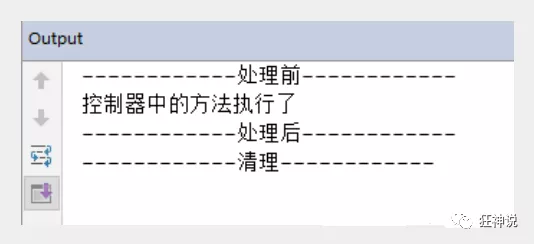
1 2 3 4 5 6 7 8 9 10 11 12 13 14 15 16 17 18 19 20 21 22 23 24 25 26 27 28 package com.kuang.interceptor; import org.springframework.web.servlet.HandlerInterceptor; import org.springframework.web.servlet.ModelAndView; import javax.servlet.http.HttpServletRequest; import javax.servlet.http.HttpServletResponse; public class MyInterceptor implements HandlerInterceptor { //在请求处理的方法之前执行 //如果返回true执行下一个拦截器 //如果返回false就不执行下一个拦截器 public boolean preHandle(HttpServletRequest httpServletRequest, HttpServletResponse httpServletResponse, Object o) throws Exception { System.out.println("------------处理前------------"); return true; } //在请求处理方法执行之后执行 public void postHandle(HttpServletRequest httpServletRequest, HttpServletResponse httpServletResponse, Object o, ModelAndView modelAndView) throws Exception { System.out.println("------------处理后------------"); } //在dispatcherServlet处理后执行,做清理工作. public void afterCompletion(HttpServletRequest httpServletRequest, HttpServletResponse httpServletResponse, Object o, Exception e) throws Exception { System.out.println("------------清理------------"); } }
4、在springmvc的配置文件中配置拦截器
1 2 3 4 5 6 7 8 9 10 11 <!--关于拦截器的配置--> <mvc:interceptors> <mvc:interceptor> <!--/** 包括路径及其子路径--> <!--/admin/* 拦截的是/admin/add等等这种 , /admin/add/user不会被拦截--> <!--/admin/** 拦截的是/admin/下的所有--> <mvc:mapping path="/**"/> <!--bean配置的就是拦截器--> <bean class="com.kuang.interceptor.MyInterceptor"/> </mvc:interceptor> </mvc:interceptors>
5、编写一个Controller,接收请求
1 2 3 4 5 6 7 8 9 10 11 12 13 14 15 16 17 package com.kuang.controller; import org.springframework.stereotype.Controller; import org.springframework.web.bind.annotation.RequestMapping; import org.springframework.web.bind.annotation.ResponseBody; //测试拦截器的控制器 @Controller public class InterceptorController { @RequestMapping("/interceptor") @ResponseBody public String testFunction() { System.out.println("控制器中的方法执行了"); return "hello"; } }
6、前端 index.jsp
1 <a href="${pageContext.request.contextPath}/interceptor">拦截器测试</a>
7、启动tomcat 测试一下!
验证用户是否登录 (认证用户)
实现思路
1、有一个登陆页面,需要写一个controller访问页面。
2、登陆页面有一提交表单的动作。需要在controller中处理。判断用户名密码是否正确。如果正确,向session中写入用户信息。返回登陆成功。
3、拦截用户请求,判断用户是否登陆。如果用户已经登陆。放行, 如果用户未登陆,跳转到登陆页面
测试:
1、编写一个登陆页面 login.jsp
1 2 3 4 5 6 7 8 9 10 11 12 13 14 15 16 17 <%@ page contentType="text/html;charset=UTF-8" language="java" %> <html> <head> <title>Title</title> </head> <h1>登录页面</h1> <hr> <body> <form action="${pageContext.request.contextPath}/user/login"> 用户名:<input type="text" name="username"> <br> 密码:<input type="password" name="pwd"> <br> <input type="submit" value="提交"> </form> </body> </html>
2、编写一个Controller处理请求
1 2 3 4 5 6 7 8 9 10 11 12 13 14 15 16 17 18 19 20 21 22 23 24 25 26 27 28 29 30 31 32 33 34 35 36 37 38 39 40 package com.kuang.controller; import org.springframework.stereotype.Controller; import org.springframework.web.bind.annotation.RequestMapping; import javax.servlet.http.HttpSession; @Controller @RequestMapping("/user") public class UserController { //跳转到登陆页面 @RequestMapping("/jumplogin") public String jumpLogin() throws Exception { return "login"; } //跳转到成功页面 @RequestMapping("/jumpSuccess") public String jumpSuccess() throws Exception { return "success"; } //登陆提交 @RequestMapping("/login") public String login(HttpSession session, String username, String pwd) throws Exception { // 向session记录用户身份信息 System.out.println("接收前端==="+username); session.setAttribute("user", username); return "success"; } //退出登陆 @RequestMapping("logout") public String logout(HttpSession session) throws Exception { // session 过期 session.invalidate(); return "login"; } }
3、编写一个登陆成功的页面 success.jsp
1 2 3 4 5 6 7 8 9 10 11 12 13 14 <%@ page contentType="text/html;charset=UTF-8" language="java" %> <html> <head> <title>Title</title> </head> <body> <h1>登录成功页面</h1> <hr> ${user} <a href="${pageContext.request.contextPath}/user/logout">注销</a> </body> </html>
4、在 index 页面上测试跳转!启动Tomcat 测试,未登录也可以进入主页!
1 2 3 4 5 6 7 8 9 10 11 12 13 <%@ page contentType="text/html;charset=UTF-8" language="java" %> <html> <head> <title>$Title$</title> </head> <body> <h1>首页</h1> <hr> <%--登录--%> <a href="${pageContext.request.contextPath}/user/jumplogin">登录</a> <a href="${pageContext.request.contextPath}/user/jumpSuccess">成功页面</a> </body> </html>
5、编写用户登录拦截器
1 2 3 4 5 6 7 8 9 10 11 12 13 14 15 16 17 18 19 20 21 22 23 24 25 26 27 28 29 30 31 32 33 34 35 36 37 38 39 40 package com.kuang.interceptor; import org.springframework.web.servlet.HandlerInterceptor; import org.springframework.web.servlet.ModelAndView; import javax.servlet.ServletException; import javax.servlet.http.HttpServletRequest; import javax.servlet.http.HttpServletResponse; import javax.servlet.http.HttpSession; import java.io.IOException; public class LoginInterceptor implements HandlerInterceptor { public boolean preHandle(HttpServletRequest request, HttpServletResponse response, Object handler) throws ServletException, IOException { // 如果是登陆页面则放行 System.out.println("uri: " + request.getRequestURI()); if (request.getRequestURI().contains("login")) { return true; } HttpSession session = request.getSession(); // 如果用户已登陆也放行 if(session.getAttribute("user") != null) { return true; } // 用户没有登陆跳转到登陆页面 request.getRequestDispatcher("/WEB-INF/jsp/login.jsp").forward(request, response); return false; } public void postHandle(HttpServletRequest httpServletRequest, HttpServletResponse httpServletResponse, Object o, ModelAndView modelAndView) throws Exception { } public void afterCompletion(HttpServletRequest httpServletRequest, HttpServletResponse httpServletResponse, Object o, Exception e) throws Exception { } }
6、在Springmvc的配置文件中注册拦截器
1 2 3 4 5 6 7 <!--关于拦截器的配置--> <mvc:interceptors> <mvc:interceptor> <mvc:mapping path="/**"/> <bean id="loginInterceptor" class="com.kuang.interceptor.LoginInterceptor"/> </mvc:interceptor> </mvc:interceptors>
7、再次重启Tomcat测试!
OK,测试登录拦截功能无误.
文件上传和下载
准备工作
文件上传是项目开发中最常见的功能之一 ,springMVC 可以很好的支持文件上传,但是SpringMVC上下文中默认没有装配MultipartResolver,因此默认情况下其不能处理文件上传工作。如果想使用Spring的文件上传功能,则需要在上下文中配置MultipartResolver。
前端表单要求:为了能上传文件,必须将表单的method设置为POST,并将enctype设置为multipart/form-data。只有在这样的情况下,浏览器才会把用户选择的文件以二进制数据发送给服务器;
对表单中的 enctype 属性做个详细的说明:
application/x-www=form-urlencoded:默认方式,只处理表单域中的 value 属性值,采用这种编码方式的表单会将表单域中的值处理成 URL 编码方式。
multipart/form-data:这种编码方式会以二进制流的方式来处理表单数据,这种编码方式会把文件域指定文件的内容也封装到请求参数中,不会对字符编码。
text/plain:除了把空格转换为 “+” 号外,其他字符都不做编码处理,这种方式适用直接通过表单发送邮件。
1 2 3 4 <form action="" enctype="multipart/form-data" method="post"> <input type="file" name="file"/> <input type="submit"> </form>
一旦设置了enctype为multipart/form-data,浏览器即会采用二进制流的方式来处理表单数据,而对于文件上传的处理则涉及在服务器端解析原始的HTTP响应。在2003年,Apache Software Foundation发布了开源的Commons FileUpload组件,其很快成为Servlet/JSP程序员上传文件的最佳选择。
Servlet3.0规范已经提供方法来处理文件上传,但这种上传需要在Servlet中完成。
而Spring MVC则提供了更简单的封装。
Spring MVC为文件上传提供了直接的支持,这种支持是用即插即用的MultipartResolver实现的。
Spring MVC使用Apache Commons FileUpload技术实现了一个MultipartResolver实现类:
CommonsMultipartResolver。因此,SpringMVC的文件上传还需要依赖Apache Commons FileUpload的组件。
文件上传
1、导入文件上传的jar包,commons-fileupload , Maven会自动帮我们导入他的依赖包 commons-io包;
1 2 3 4 5 6 7 8 9 10 11 12 <!--文件上传--> <dependency> <groupId>commons-fileupload</groupId> <artifactId>commons-fileupload</artifactId> <version>1.3.3</version> </dependency> <!--servlet-api导入高版本的--> <dependency> <groupId>javax.servlet</groupId> <artifactId>javax.servlet-api</artifactId> <version>4.0.1</version> </dependency>
2、配置bean:multipartResolver
【注意!!!这个bena的id必须为:multipartResolver , 否则上传文件会报400的错误!在这里栽过坑,教训! 】
1 2 3 4 5 6 7 8 <!--文件上传配置--> <bean id="multipartResolver" class="org.springframework.web.multipart.commons.CommonsMultipartResolver"> <!-- 请求的编码格式,必须和jSP的pageEncoding属性一致,以便正确读取表单的内容,默认为ISO-8859-1 --> <property name="defaultEncoding" value="utf-8"/> <!-- 上传文件大小上限,单位为字节(10485760=10M) --> <property name="maxUploadSize" value="10485760"/> <property name="maxInMemorySize" value="40960"/> </bean>
CommonsMultipartFile 的 常用方法:
String getOriginalFilename():获取上传文件的原名 InputStream getInputStream():获取文件流 void transferTo(File dest):将上传文件保存到一个目录文件中
我们去实际测试一下
3、编写前端页面
1 2 3 4 <form action="/upload" enctype="multipart/form-data" method="post"> <input type="file" name="file"/> <input type="submit" value="upload"> </form>
4、Controller
1 2 3 4 5 6 7 8 9 10 11 12 13 14 15 16 17 18 19 20 21 22 23 24 25 26 27 28 29 30 31 32 33 34 35 36 37 38 39 40 41 42 43 44 45 46 47 48 49 50 package com.kuang.controller; import org.springframework.stereotype.Controller; import org.springframework.web.bind.annotation.RequestMapping; import org.springframework.web.bind.annotation.RequestParam; import org.springframework.web.multipart.commons.CommonsMultipartFile; import javax.servlet.http.HttpServletRequest; import java.io.*; @Controller public class FileController { //@RequestParam("file") 将name=file控件得到的文件封装成CommonsMultipartFile 对象 //批量上传CommonsMultipartFile则为数组即可 @RequestMapping("/upload") public String fileUpload(@RequestParam("file") CommonsMultipartFile file , HttpServletRequest request) throws IOException { //获取文件名 : file.getOriginalFilename(); String uploadFileName = file.getOriginalFilename(); //如果文件名为空,直接回到首页! if ("".equals(uploadFileName)){ return "redirect:/index.jsp"; } System.out.println("上传文件名 : "+uploadFileName); //上传路径保存设置 String path = request.getServletContext().getRealPath("/upload"); //如果路径不存在,创建一个 File realPath = new File(path); if (!realPath.exists()){ realPath.mkdir(); } System.out.println("上传文件保存地址:"+realPath); InputStream is = file.getInputStream(); //文件输入流 OutputStream os = new FileOutputStream(new File(realPath,uploadFileName)); //文件输出流 //读取写出 int len=0; byte[] buffer = new byte[1024]; while ((len=is.read(buffer))!=-1){ os.write(buffer,0,len); os.flush(); } os.close(); is.close(); return "redirect:/index.jsp"; } }
5、测试上传文件,OK!
采用file.Transto 来保存上传的文件
1、编写Controller
1 2 3 4 5 6 7 8 9 10 11 12 13 14 15 16 17 18 19 20 /* * 采用file.Transto 来保存上传的文件 */ @RequestMapping("/upload2") public String fileUpload2(@RequestParam("file") CommonsMultipartFile file, HttpServletRequest request) throws IOException { //上传路径保存设置 String path = request.getServletContext().getRealPath("/upload"); File realPath = new File(path); if (!realPath.exists()){ realPath.mkdir(); } //上传文件地址 System.out.println("上传文件保存地址:"+realPath); //通过CommonsMultipartFile的方法直接写文件(注意这个时候) file.transferTo(new File(realPath +"/"+ file.getOriginalFilename())); return "redirect:/index.jsp"; }
2、前端表单提交地址修改
3、访问提交测试,OK!
文件下载
文件下载步骤:
1、设置 response 响应头
2、读取文件 – InputStream
3、写出文件 – OutputStream
4、执行操作
5、关闭流 (先开后关)
代码实现:
1 2 3 4 5 6 7 8 9 10 11 12 13 14 15 16 17 18 19 20 21 22 23 24 25 26 27 28 29 30 31 @RequestMapping(value="/download") public String downloads(HttpServletResponse response ,HttpServletRequest request) throws Exception{ //要下载的图片地址 String path = request.getServletContext().getRealPath("/upload"); String fileName = "基础语法.jpg"; //1、设置response 响应头 response.reset(); //设置页面不缓存,清空buffer response.setCharacterEncoding("UTF-8"); //字符编码 response.setContentType("multipart/form-data"); //二进制传输数据 //设置响应头 response.setHeader("Content-Disposition", "attachment;fileName="+URLEncoder.encode(fileName, "UTF-8")); File file = new File(path,fileName); //2、 读取文件--输入流 InputStream input=new FileInputStream(file); //3、 写出文件--输出流 OutputStream out = response.getOutputStream(); byte[] buff =new byte[1024]; int index=0; //4、执行 写出操作 while((index= input.read(buff))!= -1){ out.write(buff, 0, index); out.flush(); } out.close(); input.close(); return null; }
前端
1 <a href="/download">点击下载</a>
测试,文件下载OK,大家可以和我们之前学习的JavaWeb原生的方式对比一下,就可以知道这个便捷多了!